A local report has an interview, a photograph of the building, and no footage of the event itself. The missing scene leaves an awkward gap in the video edit. Generating something that resembles the event might make the sequence smoother, but it also gives viewers a scene that no camera recorded.
The editorial decision begins with the role of that missing image. Does the report need evidence of what happened, an explanation of an idea, or simply a transition between two verified pieces of material? Generated motion can be useful for the latter two jobs when its status is clear. It cannot turn an unrecorded event into recorded evidence.
Name the Gap Before Choosing a Moving Image
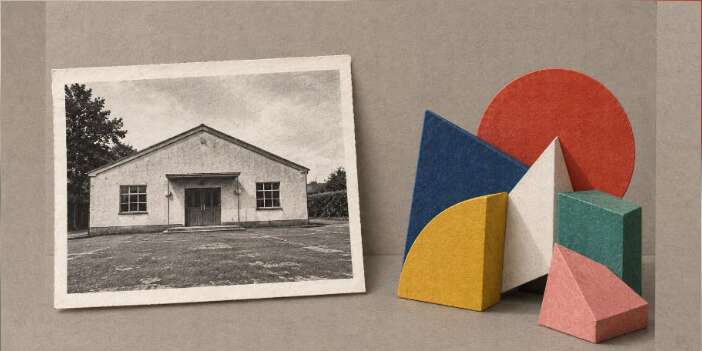
Imagine a report about a planned renovation of a community hall. The newsroom has current exterior photographs and an interview about the proposal. It has no footage of construction because construction has not begun. A realistic clip of workers inside the hall would fill the timeline while creating a false impression about the project's stage.
The missing material is not necessarily a production failure. It may be an accurate reflection of what is known. Use the exterior photograph while explaining the proposal, or illustrate the general idea of a space being reconsidered. Neither option needs to pretend that the future work has already happened. The visual choice should follow the reporting, even if that produces a quieter sequence.
AIVideoEditor.me offers image-to-video generation as well as prompt-led video creation. That can help an editor explore an illustrative insert, such as an abstract arrangement of blocks changing shape. The insert should explain a concept without impersonating the hall or the people involved. A real photograph and an invented representation have different editorial jobs, even when they appear in the same report.
Distinguish Evidence From Explanation and Transitional Material
Evidence shows something the report is entitled to present as recorded or otherwise verified. Explanation makes an idea easier to understand. Transitional material helps the sequence move between topics. A shot can serve more than one purpose, but that does not remove the need to know where its factual authority comes from.
An AI video editor is more defensible in this workflow when it produces a clearly illustrative visual for a defined explanatory passage. In the hall example, simple geometric forms could suggest alternative uses of space. They should not imply an approved floor plan, a completed design, or dimensions the reporter has not verified.
Keep the illustration visually distinct from the recorded material. A restrained paper or drawn treatment can help signal that difference, although style alone is not sufficient disclosure. A realistic treatment may require more explicit context because viewers can reasonably read it as footage. Choose the form around that interpretation risk instead of assuming that every audience will recognize generation artifacts.
AIVideoEditor.me can transform an existing image into motion, but motion itself may add a claim. A still exterior becoming a bustling entrance could imply attendance or activity absent from the source. Even a small visual addition deserves attention when the report concerns a particular place. When movement contributes no necessary explanation, keeping the still is an editorially sound choice.
For an abstract transition, keep the content modest. A sheet folding, a block moving, or a neutral visual change can bridge sections without inventing a scene. Avoid introducing symbols that imply blame, danger, or approval unless the reporting supports that meaning. An illustration can mislead through suggestion even when nobody mistakes it for a literal recording.

Make the Illustration Status Travel With the Clip
Context is easiest to lose when a short segment is copied out of a longer report. An opening disclosure may disappear, and a caption under the original article may not accompany a reposted video. Decide how the illustrative status will remain understandable in the version people are likely to see. This is part of editing the report, not an optional note for the production folder.
Teams that edit videos online can keep the generated insert separate from the source footage during assembly. That makes it easier to attach appropriate explanatory wording and avoid mixing it into a montage of real event scenes. The wording should identify what the insert represents without claiming that it reconstructs a moment the newsroom cannot document.
Check the actual excerpt intended for social sharing. Does it begin inside the generated sequence? Does the accompanying sentence make clear that the scene is illustrative? Does the next recorded shot encourage viewers to connect the invented image to a real location? A technically accurate label can still leave a misleading overall impression when the surrounding edit suggests otherwise.
Ask a colleague unfamiliar with the production to describe what they think they have seen. Do they call the insert footage from the hall, a proposed design, or an abstract illustration? If their answer differs from the intended role, revise the edit or use a simpler visual. You are checking interpretation, not asking them to guess which tool was used.
AIVideoEditor.me can supply alternative visual directions if the first treatment is too close to documentary imagery. Keep the brief tied to the explanatory job. Replacing one realistic reconstruction with another does not solve the underlying issue. A clearly abstract insert, an authenticated still, or a plain transition may answer the editorial need with less ambiguity.
Use a short visual-role check before approving the final excerpt:
Identify which images document the reported place or event.
Identify which images explain an idea without documenting it.
Remove any transition that suggests an unsupported event or outcome.
If the distinction remains difficult to explain in a brief caption, reconsider the image itself. A label should clarify a reasonable visual choice, not repair an edit whose central impression is false. An abstract transition with fewer details may need less explanation than a realistic invented scene. That can make the report easier to follow as well as easier to verify. The extra production effort behind a clip is not a reason to retain it when its role remains ambiguous.
Retain the original reporting materials separately from the generated assets. Another editor should be able to identify which files document the story and which were created to illustrate it. That distinction helps later corrections as well as publication. If the proposal changes, the team can update the explanation without treating an invented scene as part of the factual archive.
Choose a Still When Motion Adds No Reporting Value
A report does not become incomplete because every sentence lacks a moving picture. AIVideoEditor.me is useful for bounded illustrative work when the editor has a clear purpose and can preserve the context. Keep actual footage for actual events, and let a photograph remain a photograph when animation would add an unsupported impression.
The final check is whether a viewer can tell what the image is doing in the report. Evidence, explanation, and transition are all legitimate roles. Confusing them to smooth an edit is avoidable. Publish the version that makes the reporting clearer, even when that version contains less motion.
Kaynak:HABER MERKEZİ