
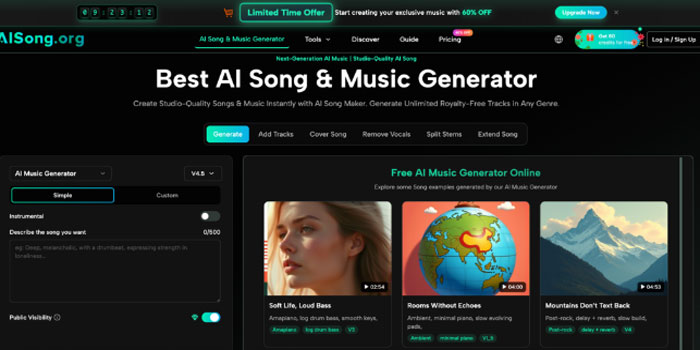
Traditionally, solving either problem meant hiring session musicians, booking studio time, or spending weeks learning music production from scratch.
AISong's Add Tracks feature changes that equation entirely. It's a bidirectional AI layering tool built directly into the AI Song Generator platform — one that lets you add a complete AI vocal performance to an existing instrumental, or generate a full backing arrangement around an existing vocal recording, all within a single interface.
What Is the Add Tracks Feature?
Add Tracks is a post-generation production tool inside AISong that works in two distinct directions:
- Add Vocals to an Instrumental — select any instrumental track from your library, write your lyrics, choose a vocal style, and the AI generates a complete vocal performance layered on top of your existing music
- Add Instrumental to a Vocal — select a vocal-only or a cappella recording, describe the arrangement style you want, and the AI composes a full backing track built specifically around your vocals
Both directions use an Audio Weight slider (0–100%) that controls how tightly the AI-generated layer follows the source material. Set it high and the new layer closely mirrors the tempo, key, and energy of what already exists. Set it lower and the AI takes more creative freedom in how it interprets the arrangement.
How to Use Add Tracks in 3 Steps
Step 1 — Select Your Source Track
Open the Add Tracks tool from the main navigation inside AI Song. Choose an existing track from your music library — either an instrumental you want to add vocals to, or a vocal recording you want to build a backing arrangement around. For the best results, use clean, well-mixed source material.
Step 2 — Configure Your Layer
If adding vocals: write your lyrics using structural tags ([Verse 1], [Chorus], [Bridge]) and describe the vocal style — "soulful female R&B vocals, warm tone, mid-tempo." Set your Audio Weight to control how closely the vocals follow the existing music. Starting at 50–70% is recommended for most projects.
If adding instrumentals: describe the arrangement in specific terms. "Acoustic guitar, brushed drums, warm upright bass — indie folk feel" will produce very different results from "hard-hitting 808 bass, trap hi-hats, layered synth pads." The more specific your description, the more targeted the output.
Step 3 — Generate, Preview, and Refine
Hit generate and wait approximately 30 to 60 seconds. Preview the layered result in the built-in player. If the blend doesn't feel right, adjust the Audio Weight and regenerate. Each version saves automatically to your library for easy comparison.
More Tools Inside AISong
Add Tracks is one part of a complete nine-function production suite. The other tools inside the platform cover every stage of the music creation workflow.
Create — From Idea to Finished Song
- AI Music Generator: converts text prompts or lyrics into complete professionally mixed tracks across 30+ genres, with full commercial rights on every output
- AI Lyrics Generator: produces structured verse-chorus-bridge lyrics from any topic, keyword, or emotion — multiple versions generated simultaneously for comparison
- Text / Lyrics to Music: turns any existing text — a poem, brand message, or personal story — into a finished song with original melody, arrangement, and vocals
Separate — Vocals, Instrumentals, and Stems
- Vocal Remover: isolates vocals from instrumentals with 98% accuracy in under 60 seconds, outputting two clean files — a cappella vocals and pure instrumental backing track
- Stem Splitter: breaks any track into 4 to 12 individual stems (drums, bass, guitar, keys, strings) for full DAW-compatible post-production control
Extend and Transform — Finish, Reshape, and Deliver
- AI Song Cover: transforms any track into an alternate vocal version using genre-specialized voices including pop, rock, R&B, and country
- Extend Song: adds seamless new material at any chosen timestamp using a visual waveform editor, matching the original key, tempo, and energy
- MP3 to WAV Converter: converts any track to lossless 44.1kHz WAV for professional studio, broadcast, and commercial distribution use
How These Tools Work Together
The real value of AISong is not any single feature — it's how each tool connects into a continuous creative workflow that takes a project from first idea to finished, commercially licensed output without switching platforms.
- Start with the AI Music Generator or Text to Music to produce a base track from a prompt or existing lyrics
- Use Add Tracks to layer vocals onto a beat, or build a full arrangement around a recorded vocal performance
- Run the result through Vocal Remover or Stem Splitter to isolate individual elements for further editing or remixing
- Use Extend Song to hit an exact video duration or complete a track that needs a bridge or outro
- Apply AI Song Cover to explore alternate vocal directions before committing to a final version
- Export everything in lossless WAV when the track is ready for professional delivery, broadcast, or commercial distribution
Each tool feeds into the next, which means a project can move from blank page to finished song entirely within AISong — no extra subscriptions, no file re-uploading, no platform switching required.
AISong Pricing
Plan
Monthly (Annual)
Annual Total
Credits/Year
Best For
Free
$0
$0
10 generations
Testing the platform, no sign-up required
Starter
$8/month
$96/year
~18,000 credits
Individual creators and small teams
Pro
$28/month
$336/year
~72,000 credits
High-output creators and freelancers
Unlimited
$59/month
$708/year
Unlimited + 18,000 bonus
Agencies, studios, large-scale operations
All paid plans include full commercial rights, WAV downloads, access to all 9 production tools, and no watermarks. Full pricing details at aisong.org/pricing.
Conclusion
Add Tracks solves one of the most common production bottlenecks in AI music creation: the gap between having a strong musical idea and being able to execute it completely. Whether you're building vocals onto a finished beat or wrapping a professional arrangement around a vocal melody you recorded on your phone, the tool brings that completion within reach — no studio required, no session musician needed, no separate platform to log into.
Start building complete tracks at aisong.org — free to try, no sign-up required.
Kaynak:Haber Merkezi